 Doc Summary

Only for client
Accessing Job Listings #
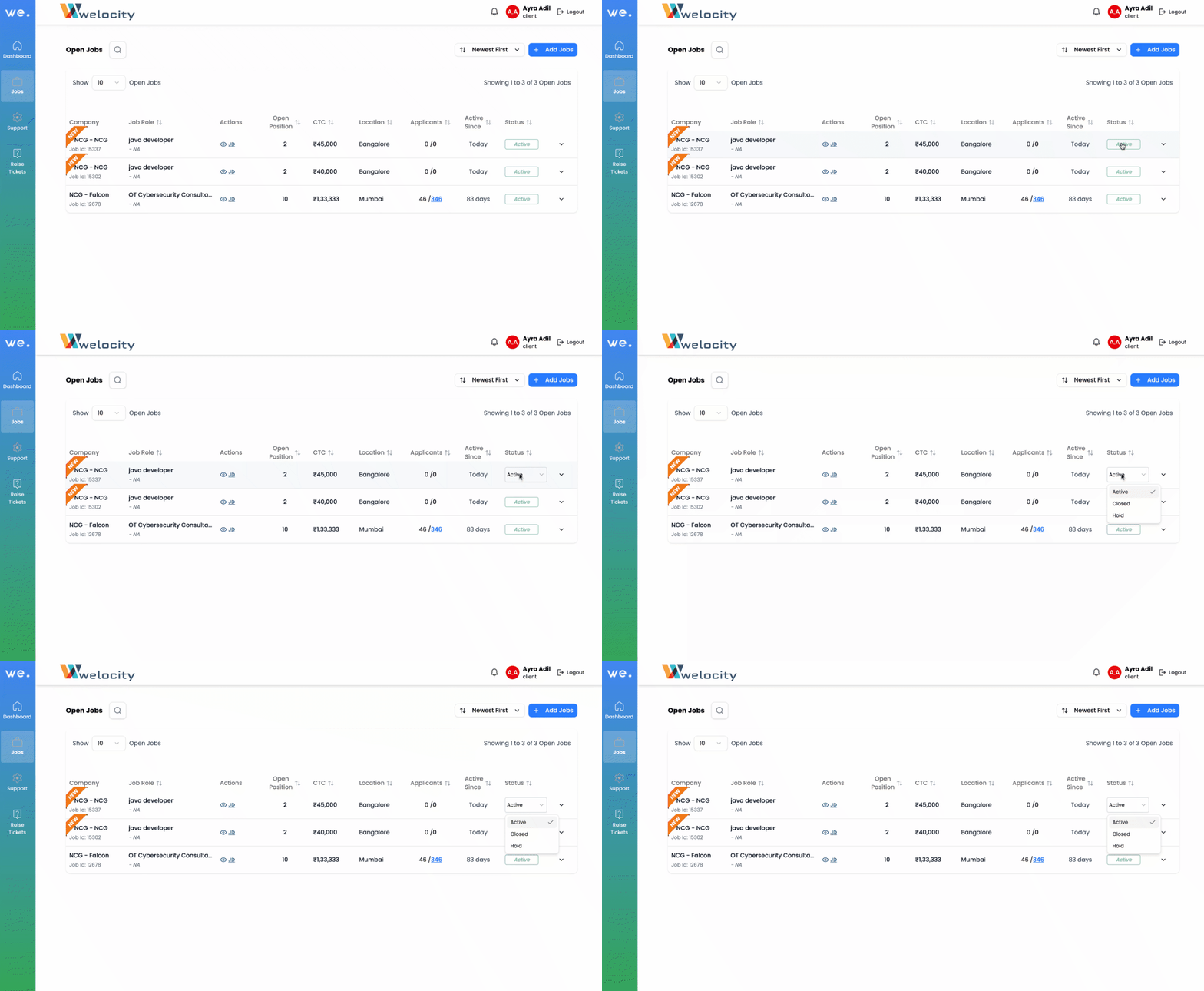
To view all job postings, start by clicking on the “Jobs” icon located just below the Dashboard. This will open a list of all available jobs. For each job, you will see key details such as the company name, job role, location, and the number of open positions for that specific role.
On the right side of the list, you’ll find the activity status of each job. This allows you to control whether the job is currently active or not.
⚙️ Managing Job Status #
You can manage the status of each job using the activity status dropdown on the far right:
- Active: Select this when the job is currently open, and candidates are still allowed to apply.
- Closed: Use this option when the position has been filled or is no longer accepting applications.
- On Hold: Choose this if you want to temporarily pause the job for any reason (e.g., internal delays, change in requirement, etc.).
Best Practice Tip #
Keep the job statuses updated regularly to ensure that recruiters upload candidates only for the roles that are genuinely open and that our hiring team maintains an accurate overview of all roles.


