 Doc Summary

How to Register as a Recruiter or Vendor on Welocity.ai #
Overview #
Welocity.ai is an AI-powered intelligent fulfillment center designed to revolutionize the recruitment process. This guide will walk you through the simple registration process for recruiters and vendors looking to join our platform.
Prerequisites #
Before you begin, ensure you have:
- A valid email address
- Access to your mobile phone for SMS verification
- A secure password ready for your account
Step-by-Step Registration Process #
Step 1: Access the Registration Page #
- Navigate to https://app.welocity.ai/login
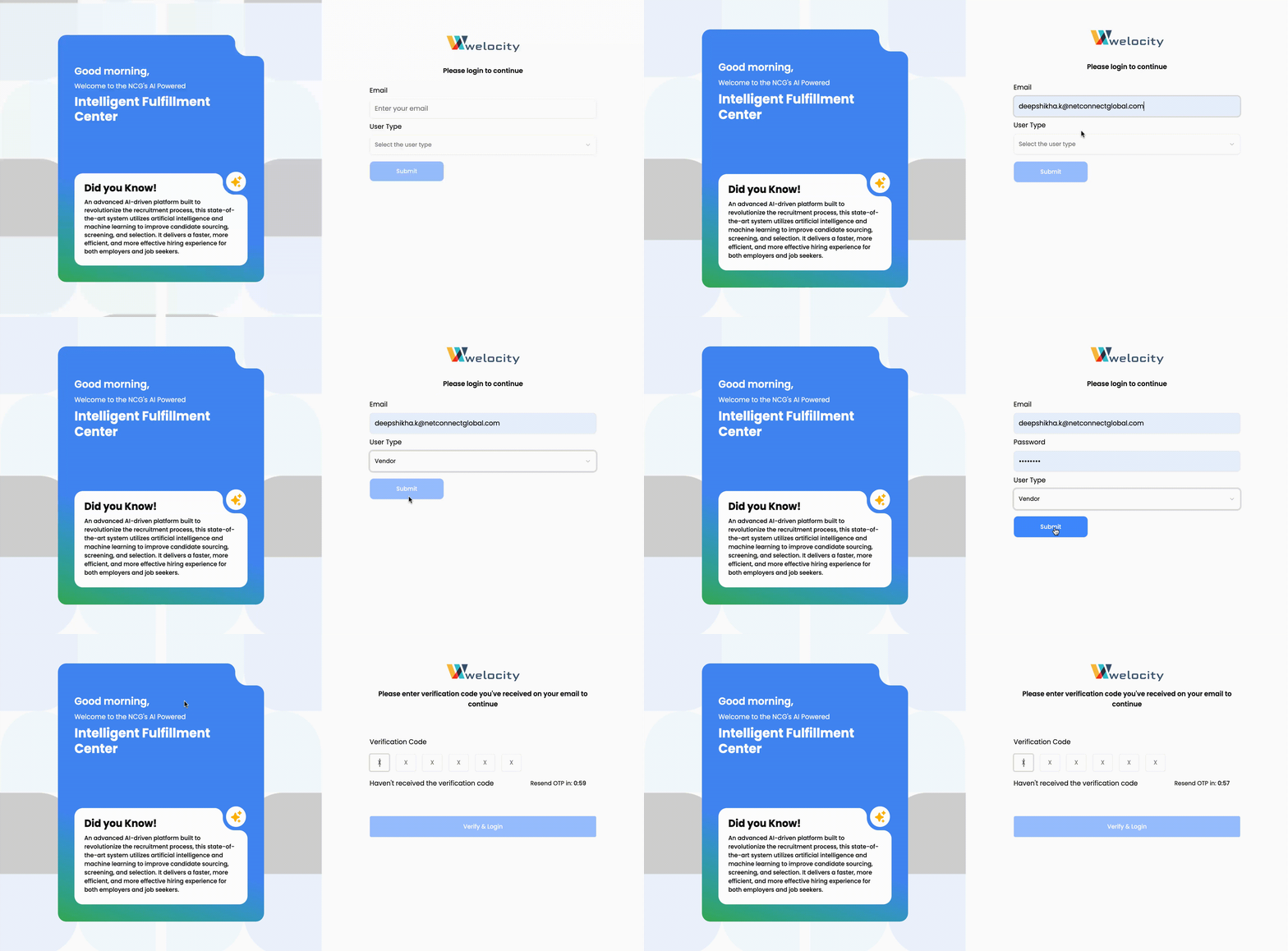
- You’ll see the Welocity login interface
Step 2: Enter Your Email Address #
- Locate the email input field on the login page
- Enter your valid email address
- This email will be used for account verification and future communications
Step 3: Select Account Type #
- Look for the account type selection options
- Choose “Vendor” from the available options
- This selection applies to both recruiters and vendors
- The vendor category encompasses recruitment service providers
Step 4: Set Your Password #
Once you select “Vendor,” two password fields will appear:
- Password Field: Enter a strong, secure password
- Use a combination of uppercase and lowercase letters
- Include numbers and special characters
- Minimum 8 characters recommended
- Confirm Password Field: Re-enter the same password
- Ensure both passwords match exactly
- This prevents password entry errors
Step 5: Complete Email and SMS Verification #
After submitting your registration information:
- Check Your Email: An OTP (One-Time Password) will be sent to your registered email address
- Check Your SMS: A verification code will also be sent to your mobile phone
- Enter OTP: Input the received OTP in the verification field on the website
Step 6: Access Your Dashboard #
Once verification is complete:
- You will be automatically logged into your account
- You’ll be redirected to your personalized dashboard
- Your account is now active and ready to use
Important Notes #
Security Recommendations:
- Use a unique, strong password for your Welocity account
- Keep your login credentials secure and confidential
- Do not share your OTP codes with anyone
Verification Process:
- OTP codes are typically valid for a limited time (usually 5-10 minutes)
- If you don’t receive the OTP, check your spam/junk folders
- Ensure your mobile phone has good signal reception for SMS delivery
Account Access:
- After successful registration, bookmark the dashboard URL for easy future access
- Your vendor dashboard will provide access to all platform features and tools
Troubleshooting #
Common Issues and Solutions:
- OTP not received: Check spam folders and ensure phone number is correct
- Password mismatch error: Verify both password fields contain identical information
- Email already registered: Use the “Forgot Password” option if you already have an account
Getting Started After Registration #
Once you’re logged into your dashboard, you can:
- Complete your vendor/recruiter profile
- Browse available opportunities
- Access AI-powered recruitment tools
- Manage your client relationships
- Track your recruitment metrics
Support #
If you encounter any issues during the registration process, please contact our support team through the help section on the website or reach out to our customer service for immediate assistance.


