 Doc Summary

- Go to “Jobs”: Simply click the “Jobs” icon located just below your dashboard icon on the left-hand menu.
- View Your Active Job Postings: This will take you to a complete, up-to-date list of all your active job postings. Thanks to Octo’s smart system, all key details are automatically organized and stored for you, including:
- Job roles and titles
- Number of positions available
- Offered compensation (CTC)
- Job location
- Total applicants for each role
- Job status and detailed job descriptions (JD)
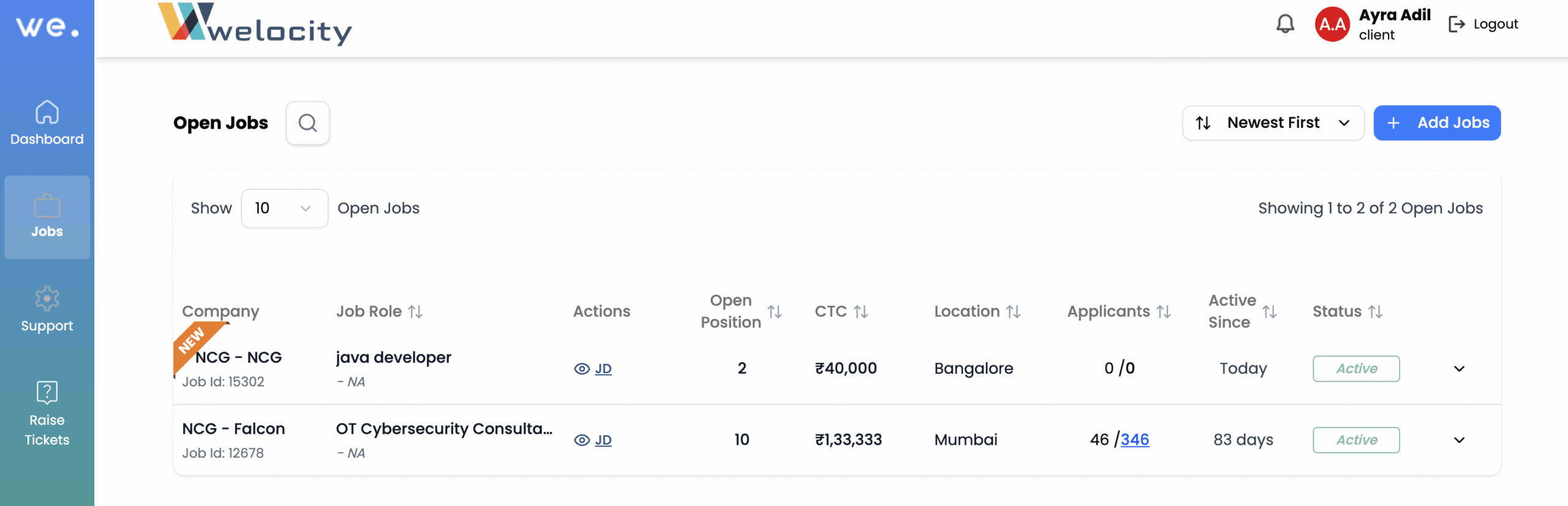
- Review Job Details:
- To view the full Job Description (JD), simply click on the “JD” button next to the job posting.
- If you want to quickly review a specific part of the JD without reading the entire document, click on “Ask Octo.” Octo can help you pinpoint the information you need!
Octo streamlines your job management, ensuring all crucial information is at your fingertips. Let me know if you need any further assistance!


