 Doc Summary

Prerequisites:
- You have identified a candidate you wish to interview.
- The candidate’s profile is accessible.
Here’s how to schedule an interview for a candidate using Octo:
- Go to Candidates: On the left-hand menu, click on the “Candidates” icon (located below the “Jobs” icon). This will display a list of all your candidates.
- Select a Candidate: Click on the specific candidate you wish to schedule an interview for. This will take you to their detailed profile.
3.Initiate Scheduling: On the candidate’s profile, scroll down below their AI-generated summary. You will see several options, including “BGC,” “BGV,” “Schedule,” and “FastTrack.” Click on “Schedule.”
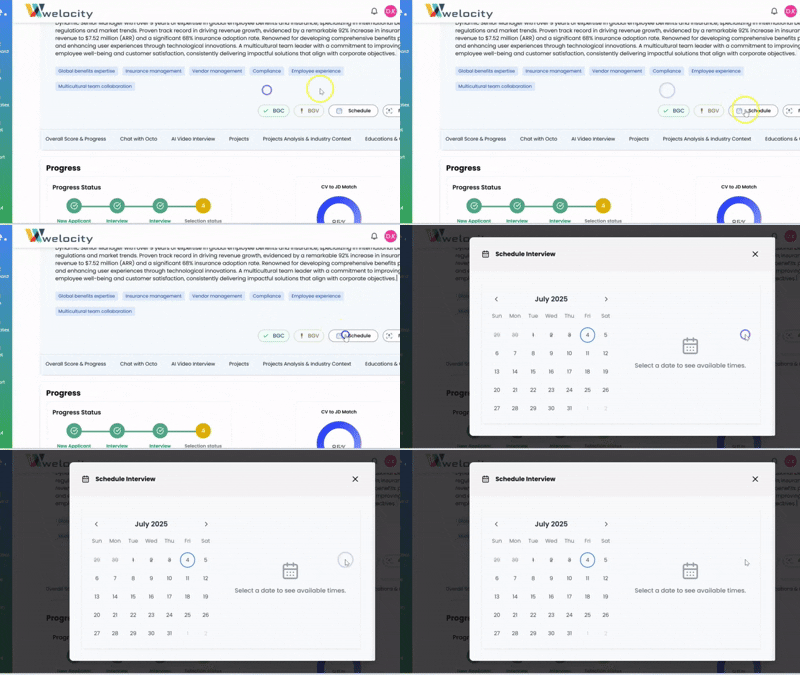
4.Select Slot and Date: A scheduling interface will appear. Here, you can select the desired time slot and date for the interview.
5.Octo Notifies Candidate: Once you confirm the schedule, Octo will automatically generate and send both an email and a WhatsApp message to the candidate. These messages will inform them about the Octo interview and allow them to select their preferred time slot and date to proceed with the interview.
6.Recruiter Notification: You, as the recruiter, will be notified about the scheduled interview and can then proceed with the next steps in your recruitment process.
Octo makes scheduling interviews seamless and efficient! Let me know if you need assistance with anything else.


